
How to Do SEO for Website Step by Step (Beginner Tutorial)
If you type “how to do SEO for a website step by step” into Google, you get hundreds of articles. Most of them list 50 tips in random order. No structure. No priority. You finish reading and still don’t know where to start.
I work as an SEO analyst. Every week, a client or a business owner asks me the same question: “I have a website, sales are low, what do I fix first?”
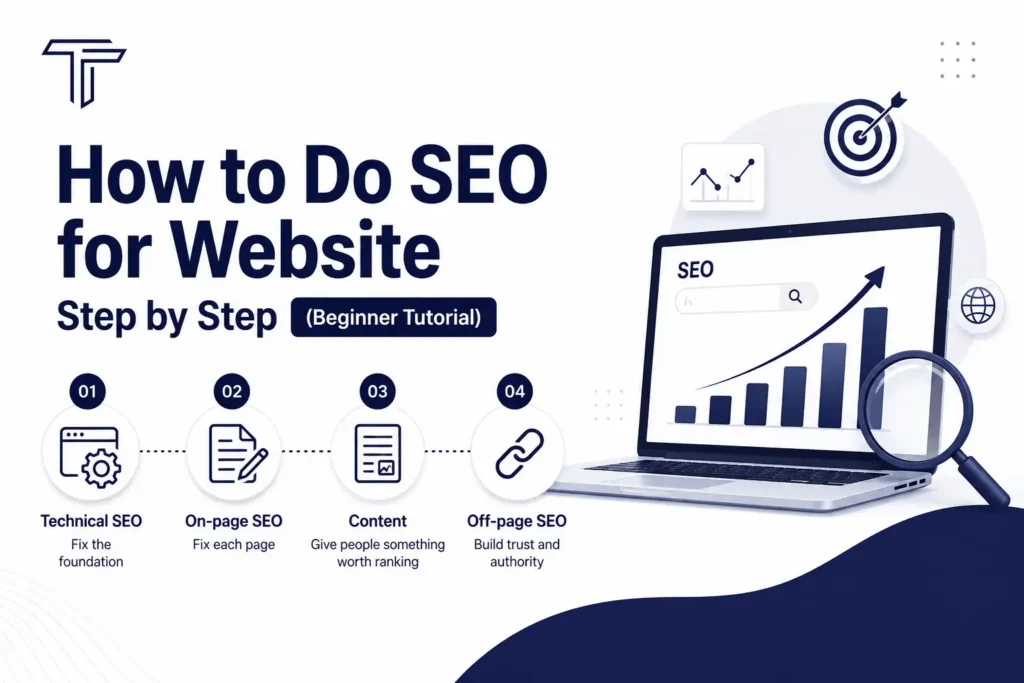
So here is the honest answer. SEO is not one task. It is four parts, done in a fixed order:
- Technical SEO (fix the foundation)
- On-page SEO (fix each page)
- Content (give people something worth ranking)
- Off-page SEO (build trust and authority)
Do them in this order. Not random. Let’s go step by step.
Quick Answer: SEO Process in 10 Steps
If you’re in a hurry, here’s the short version:
- Do a technical SEO audit
- Fix crawlability and indexability
- Improve site speed and mobile experience
- Do keyword research
- Optimize title, meta description, and headings
- Write content that matches search intent
- Add internal links and schema markup
- Publish and get the page indexed
- Build backlinks and local listings
- Monitor rankings and update content regularly
Now let’s break each part down properly, so you actually know how to do SEO for your website – not just what to do.
Step 1: Technical SEO Audit – Fix the Foundation First
Here’s a mistake I see all the time. A client writes great content, but Google never shows it. Why? Because the site has technical problems. Google’s bots can’t crawl the page, or the page loads too slowly, or there’s no HTTPS.
Content and backlinks don’t matter if your site is technically broken. So we start here.
1.1 Crawlability – Can Google Even Find Your Pages?
Check these:
| Check | Why it matters |
|---|---|
| Robots.txt is correctly configured | A wrong rule can block your whole site from Google |
| XML sitemap is submitted | Helps Google discover pages faster |
| No accidental noindex/nofollow tags | These tags literally tell Google “don’t show this page” |
| Broken links (404s) are fixed | Wastes crawl budget and hurts user trust |
| No orphan pages | Pages with zero internal links rarely get indexed |
Real issue I’ve seen: A WordPress site had “Discourage search engines from indexing this site” checked in Settings > Reading. The client never touched it. Traffic was zero for months. One checkbox. That’s it.
1.2 Indexability – Is Google Actually Showing Your Pages?
- Use correct canonical tags (tell Google the “main” version of a page)
- Fix duplicate content issues
- Improve or remove thin pages (pages with very little content)
- Handle pagination and filter/search pages properly
1.3 Website Speed – Core Web Vitals
Google measures three things:
- LCP (Largest Contentful Paint): should load under 2.5 seconds
- INP (Interaction to Next Paint): should respond under 200ms
- CLS (Cumulative Layout Shift): should stay under 0.1
How to improve speed:
- Compress and resize images
- Enable lazy loading
- Turn on browser caching
- Enable GZIP or Brotli compression
- Minify CSS and JavaScript
- Remove unused CSS/JS
- Use a CDN if your audience is spread across regions
1.4 Mobile SEO
Google uses mobile-first indexing. That means it looks at your mobile site first, not desktop. Check:
- Responsive design
- Correct viewport setting
- Buttons and links large enough to tap
- No pop-ups that block content on mobile
1.5 HTTPS and Security
- SSL certificate installed and valid
- HTTP automatically redirects to HTTPS
- No mixed-content warnings (some resources loading over HTTP)
1.6 URL Structure
Keep URLs short and readable. Compare:
- Bad: yoursite.com/index.php?id=482&cat=12
- Good: yoursite.com/seo-for-website
Rules: use hyphens (not underscores), lowercase letters, and skip unnecessary parameters.
1.7 Site Architecture
Important pages should be reachable within 3 clicks from the homepage. Use breadcrumbs. Keep navigation simple. A confused visitor (and a confused bot) both leave.
1.8 Structured Data – Schema Markup
Schema helps Google understand your content and can get you rich results (star ratings, FAQs, breadcrumbs in search results). Common types:
- Organization schema
- Article schema
- FAQ schema
- Breadcrumb schema
- Local Business schema for local SEO
1.9 Sitemap and Robots.txt
- Sitemap should include only indexable URLs – no 404s, no redirected links
- Submit it in Google Search Console and Bing Webmaster Tools
- Robots.txt should declare the sitemap and block only admin/private pages
1.10 Redirects and Error Pages
- Use 301 redirects for permanently moved pages
- Avoid redirect chains (page A → B → C wastes crawl budget)
- Set up a custom, helpful 404 page
- Monitor 500 errors
Technical SEO Priority Order
- Crawlability & indexability
- Core Web Vitals & page speed
- HTTPS & security
- Mobile optimization
- Structured data
- Internal linking & architecture
- Canonicalization & redirects
- Sitemap & robots.txt
- Image & JavaScript SEO
- Ongoing monitoring
Tools: Google Search Console, PageSpeed Insights, Lighthouse, Screaming Frog, Ahrefs Site Audit, Semrush Site Audit, GTmetrix, Rich Results Test.
Step 2: On-Page SEO – Optimize Every Page
Once the technical base is solid, work on each page individually. This is where most beginners actually start – but skipping Step 1 first is why their efforts often don’t show results.
2.1 Keyword Research
Before writing anything, know what people actually search. Pick:
- One primary keyword (main topic – e.g., “how to do SEO for website step by step”)
- A few secondary keywords (close variations – e.g., “how to do SEO for website step by step tutorial”)
- Long-tail keywords (longer, specific phrases with lower competition)
Also check search intent – is the person looking to learn (informational), compare options (commercial), or buy (transactional)? Your content must match that intent.
2.2 URL, Title Tag, and Meta Description
| Element | Best practice |
|---|---|
| URL | Short, includes primary keyword, hyphens, lowercase |
| Title tag | 50-60 characters, keyword near the start, unique per page |
| Meta description | 140-160 characters, includes keyword, has a clear call-to-action |
2.3 Heading Structure
- Only one H1 per page, and it should include your primary keyword
- Use H2s and H3s logically, like chapters in a book
- Add secondary keywords in headings where it feels natural – never forced
2.4 Keyword Placement – Don’t Stuff
Place your primary keyword naturally in:
- Title tag
- Meta description
- URL
- H1
- First 100 words
- A couple of H2/H3 headings
- Image alt text
That’s it. If your keyword appears every second sentence, that’s stuffing, and it hurts more than it helps.
2.5 Internal and External Linking
- Link to related pages on your own site using descriptive anchor text (not “click here”)
- Link out to 1-2 authoritative external sources when it adds value
- Check that no internal or external link is broken
2.6 Image Optimization
- Use descriptive file names (seo-audit-checklist.webp, not IMG_2934.jpg)
- Add alt text to every image
- Compress images and prefer WebP/AVIF formats
- Enable lazy loading
2.7 Readability and UX
- Short paragraphs (2-3 sentences)
- Bullet points and numbered lists
- Simple words over complex ones
- Add a table of contents for long articles
- Make sure the page loads fast and looks good on mobile
2.8 EEAT – Experience, Expertise, Authoritativeness, Trust
Google wants to know: does the person writing this actually know the topic? Add:
- Author name and bio
- First-hand experience or examples (like the checkbox story above)
- Credible references
- An updated publish date
- A working About/Contact page
On-Page SEO Priority Order: Keyword research → URL → title & meta description → headings → quality content → internal linking → images → readability & UX → EEAT & schema → final validation.
Step 3: Content Optimization – Give People a Real Answer
Technical and on-page SEO won’t save weak content. This is the part that actually earns rankings and trust.
3.1 Match Search Intent First
Before writing a word, ask: what does someone typing this query actually want? A quick definition? A full tutorial? A product to buy? Answer that exact need – don’t make people scroll through your history to find the point.
3.2 Structure for Humans and AI – AEO/GEO
Search engines and AI tools (like AI Overviews) now pull direct answers from pages. To be “answer engine friendly”:
- Give a short, direct answer early in the article (like the “Quick Answer” section above)
- Use question-style subheadings
- Add a clear FAQ section
- Use lists, tables, and step-by-step formats
- Write concise definitions for key terms
This is sometimes called AEO (Answer Engine Optimization) or GEO (Generative Engine Optimization). The core idea is simple: make your content easy for a machine to summarize, because that’s what’s answering questions now – not just the blue links.
3.3 Quality and Freshness
- Original content only, no copy-pasting
- Cover the topic properly, don’t leave obvious gaps
- Update statistics and examples over time
- Remove outdated info instead of letting it sit
3.4 Engagement Elements
Add images, short videos, or simple infographics where they genuinely help. End with a clear conclusion and a call-to-action – even something as simple as “need help with your website’s SEO? Get in touch.”
Step 4: Off-Page SEO – Build Authority and Trust
Once your site is technically sound and your content is strong, it’s time to build signals outside your website.
4.1 Backlinks -The Core of Off-Page SEO
A backlink is another website linking to yours. Google treats it like a vote of confidence. Focus on:
- Backlinks from relevant, authoritative sites
- A natural mix of anchor text (not the same keyword every time)
- Removing or disavowing toxic/spammy backlinks
4.2 Guest Posting
Write for other niche-relevant websites with decent authority. Add a contextual link back to your site, usually in the content or author bio.
4.3 Local SEO and Business Listings
If you run a company website, this step matters a lot:
- Google Business Profile – fully optimized
- Bing Places, Apple Business Connect
- Directories like Justdial, Sulekha, IndiaMART (India-specific)
- Keep NAP (Name, Address, Phone) identical everywhere
4.4 Social Media and Brand Signals
- Active profiles on LinkedIn, Facebook, Instagram, YouTube
- Website link in bio
- Consistent posting builds brand searches, which Google also notices
4.5 Other Off-Page Tactics
| Tactic | What it means |
|---|---|
| Q&A marketing | Answer questions on Quora, Reddit, forums with real value |
| Broken link building | Find broken links on other sites, suggest your content as a replacement |
| Competitor backlink analysis | See where competitors get links, try to earn similar ones |
| Reviews & reputation | Collect Google, Trustpilot, or G2 reviews |
| Press releases | Share genuinely newsworthy updates with media sites |
Off-Page Priority Order: High-quality backlinks → Google Business Profile & local citations → guest posting → content marketing → social signals → brand mentions → competitor backlink analysis → reviews → broken link building → monitoring.
The Full SEO Workflow
Here’s how everything connects, from research to results:
Keyword Research
↓
Search Intent Analysis
↓
Content Planning
↓
Content Writing
↓
Content Optimization
↓
On-Page SEO
↓
Internal Linking
↓
Schema Markup
↓
Publish & Index
↓
Performance Monitoring & Content Updates
SEO isn’t a one-time task. It’s this loop, repeated every month.
Common SEO Mistakes Beginners Make
- Writing content before doing keyword research
- Ignoring site speed and mobile experience
- Stuffing keywords instead of writing naturally
- Buying cheap, spammy backlinks
- Never checking Google Search Console after publishing
- Forgetting to update old content
Recommended Tools By Category
| Category | Tools |
|---|---|
| Technical SEO | Google Search Console, Screaming Frog, PageSpeed Insights |
| Keyword Research | Google Keyword Planner, Semrush, Ahrefs |
| On-Page & Content | Surfer SEO, Rank Math/Yoast SEO, Grammarly |
| Off-Page | Ahrefs, Moz Link Explorer, BuzzSumo |
| Monitoring | Google Analytics 4, Search Console, Bing Webmaster Tools |
FAQs: How to Do SEO for Website Step by Step
1. How long does SEO take to show results?
Usually 3 to 6 months for noticeable ranking movement, depending on competition and how consistently you work on it.
2. Can I do SEO for my website myself?
Yes. Start with a technical audit, fix on-page basics, write helpful content, and slowly build backlinks. It takes time, but it’s learnable.
3. What’s more important – on-page or off-page SEO?
Both matter, but in a fixed order: fix technical and on-page first. Off-page backlinks won’t help a broken or slow website.
4. How do I improve SEO for my website quickly?
Fix crawl errors, improve page speed, write clear title tags and meta descriptions, and make sure your content actually answers the search query.
5. Is SEO different for a company website?
The core process is the same, but company websites should also focus on local SEO, business listings, and trust signals like reviews and case studies.
6. Do I need to hire an SEO agency? Not always. Small sites can follow this checklist themselves. Larger or competitive websites often benefit from expert help to save time and avoid costly mistakes.
Final Thoughts
SEO for a website, step by step, really comes down to four things: fix the technical base, optimize each page, write content people actually need, and build genuine authority off-site. Skip a step, and the rest gets harder.
Start with a full site audit today. Fix what’s broken. Then move to the next step. That’s how real, lasting SEO results happen – not shortcuts, just the right order.

Tejash Yadav is an SEO Analyst and WordPress Developer dedicated to supporting businesses by leveraging SEO and digital marketing. She provides useful tips and advice on SEO and digital marketing practices.